

Michael Turner
Head of Content at Clue · Published May 22, 2026
Clue vs LingQ: An Honest Comparison for Learning English in 2026
LingQ is the original content-based language-learning platform. Steve Kaufmann, the polyglot behind it, has been arguing since the early 2000s that you learn a language by reading and listening to enormous amounts of real material, not by drilling grammar exercises. LingQ is the tool he built to make that doctrine practical, and it has been the reference point for everything that came after — including Clue.
Clue is a newer, mobile-first English-learning app built on the same underlying belief: real content plus a fast lookup is what actually moves you forward. The two tools solve the same core problem with very different trade-offs.
Short answer: If you want to learn multiple languages on a desktop with a massive curated library, LingQ is still the deeper tool. If you specifically want to learn English on iOS, with everything working offline and for free, Clue fits better. They are closer to siblings than to enemies.
This article walks through where each one wins and where each one quietly disappoints.
Quick comparison table
| LingQ | Clue | |
|---|---|---|
| Focus | 40+ languages | English only, from 10 native languages |
| Platform | Web, iOS, Android | iOS, Android |
| Pricing | Free tier (20 saved words lifetime), Premium ~$13/mo, Premium Plus ~$40/mo | Completely free, no caps |
| Library size | Vast — community-imported plus official lessons | Smaller curated library + your own imports |
| Dictionary | Cloud lookup, multiple sources per word | 27,000-word offline dictionary, contextual translations |
| Offline mode | Limited; lookup needs internet | Full — dictionary, library, practice all offline |
| Podcast import | Possible but clunky workflow | Paste RSS, done |
| Auto-transcription | Yes, server-side | Yes, on-device with Whisper |
| SRS / flashcards | Mature, configurable | Lightweight, sentence-context cards |
| Founded | 2007 | 2024 |
| Best for | Multi-language polyglots on desktop | English learners on iPhone |
What LingQ does well
LingQ has had nearly two decades to refine its product, and the maturity shows.
The library is genuinely enormous. Tens of thousands of lessons in popular languages, contributed by users and the LingQ team. Mini-stories at every level, podcasts with synced transcripts, articles, transcribed YouTube videos, courses on specific topics. For learners who want to browse rather than bring their own content, LingQ has more pre-packaged material than anything else in the category.
The web app is a serious reading environment. Clean reader, good typography, configurable layout, multi-dictionary lookup, a mature SRS that lets you tune intervals and review types. If you do most of your study at a desk with a real keyboard, LingQ on the web is a comfortable place to spend an hour.
Multi-language coverage is unmatched. LingQ supports more than 40 languages, including less common ones like Greek, Korean, Hebrew, and Cantonese. If you are learning more than one language at once, LingQ keeps everything in one app with one shared workflow.
The methodology is well-articulated. Steve Kaufmann’s videos and podcasts make the underlying theory explicit: read and listen at a level just above your comfort, mark unknown words, review them as flashcards, accumulate “known words” over time. Whether or not you accept every claim, the framework gives learners a clear mental model.
Where LingQ’s trade-offs show
LingQ is mature, but its maturity is also its baggage.
The free tier is a teaser. You get 20 “LingQs” — saved unknown words — across your entire lifetime on the app, in all languages combined. Twenty. After that you need a Premium subscription ($13/month) or Premium Plus ($40/month for tutor credits). The free tier is functional only for a single afternoon of real use.
Lookups need a server round-trip. Tapping a word sends a request to LingQ’s servers, which means latency on slow connections and a hard dependency on internet access. On a subway, on a plane, in a rural area with patchy signal, the tap-to-translate experience gets sluggish or fails.
The mobile apps feel like ports. LingQ’s iOS and Android apps work, but the underlying design assumes you have a keyboard and a 13-inch screen. Long-press menus, small tap targets, and the general density of the reader were built for desktop and have been compressed for mobile rather than re-imagined.
Importing podcasts is clunky. You can add your own audio, but the workflow involves multiple steps and the transcription quality varies. The community has built workarounds, but it never feels native.
The interface has been redesigned more than once and not everyone agrees the changes have helped. Long-time users have complaints, and a quick look at the LingQ subreddit confirms that “the new design” is a recurring topic.
What Clue does well
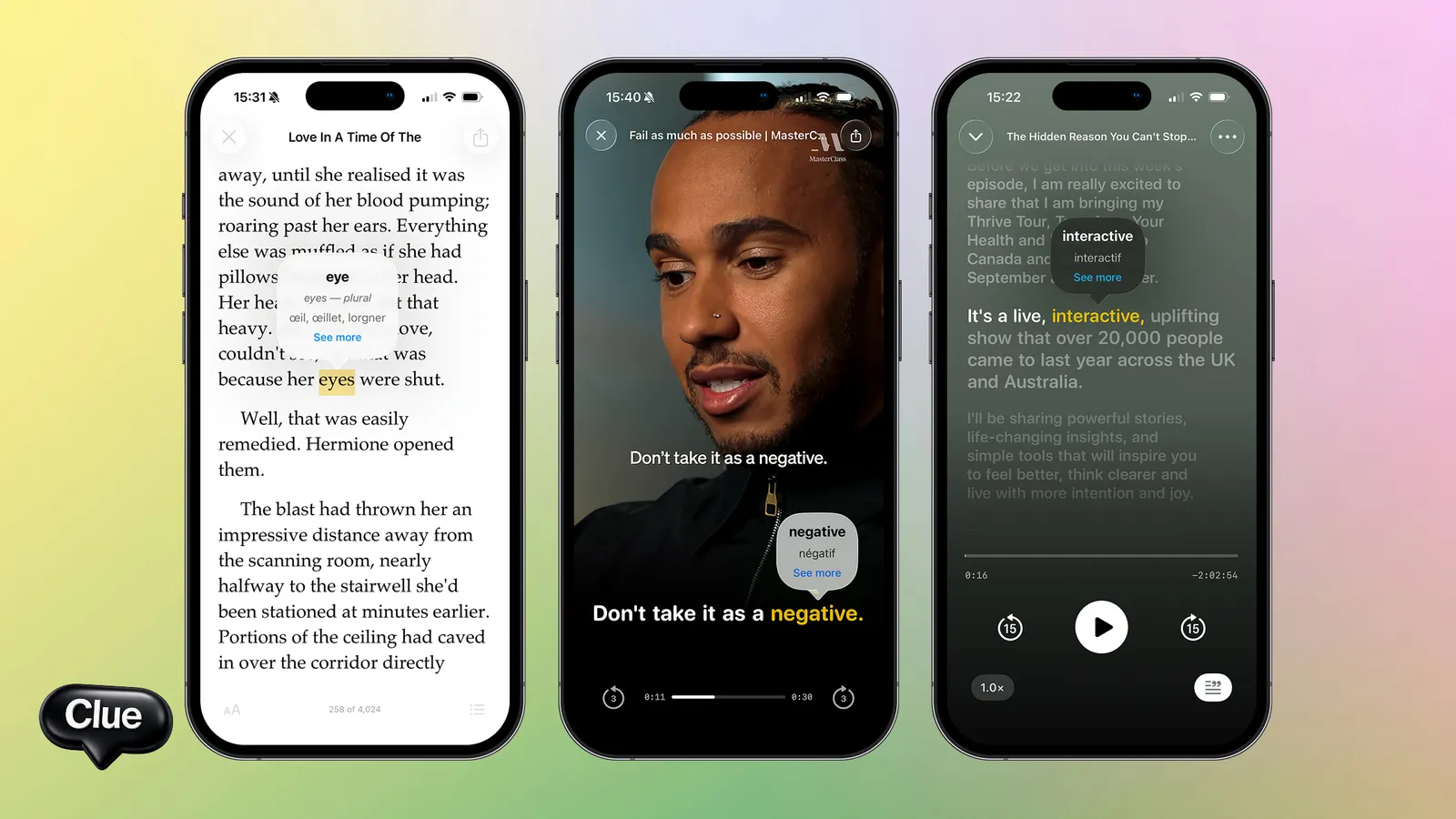
Clue is built around a much narrower problem — learning English on a phone — and the focus shows in the workflow.
The dictionary lives on the phone. All 27,000 English headwords are bundled inside the app. Tapping a word triggers a local lookup that completes in well under 100ms. No network call, no spinner, no per-lookup cost. The experience is identical on the subway, on a flight, in a cafe with broken wifi, and on home broadband.
Translations are contextual. Rather than dumping a generic dictionary entry with eight numbered senses, Clue tries to surface the sense that fits the sentence you are reading. For a learner who is still building intuition, the right sense in the right context is far more useful than a wall of definitions.
Podcast import is one paste. Paste an RSS feed and the show appears in your library. New episodes show up automatically. If the episode lacks a transcript, Clue runs Whisper on-device to generate one — your audio never leaves your phone, and there are no per-minute fees because there is no server in the loop.
Books work the same way. Drop in an EPUB, PDF, or plain text file. Project Gutenberg’s 70,000 free public-domain books are immediately available to you with one-tap translation on every word.
It is free in a real sense. No premium tier hidden behind the free one. No caps on saved words. No locked features. The entire app works for everyone, in all 10 supported native languages.
Where Clue is more limited
Clue makes hard trade-offs to keep the workflow tight, and those trade-offs are real.
English only. If you also want to learn Spanish, Japanese, or Greek, Clue cannot help. LingQ wins by default for anyone learning two or more languages.
Mobile only. Clue runs on iOS and Android, but there is no web or desktop app. If you read most of your content on a desktop, Clue is the wrong tool today.
The curated library is smaller. LingQ has more pre-packaged lessons. Clue’s bet is that bringing your own content is so fast that the curated library matters less, but if you genuinely want to browse “lessons at B1” without thinking about it, LingQ still has more.
SRS is intentionally lightweight. Clue’s practice mode is multiple-choice with sentence context. Anki users who want deep configuration over intervals and card types will find it minimal. The trade-off is that it requires zero setup.
Pricing in practice
LingQ’s pricing has shifted over the years, but the current shape is:
- Free: 20 saved words, lifetime, across all languages.
- Premium: roughly $12–14/month depending on billing period.
- Premium Plus: roughly $40/month, includes tutor credits.
Over five years, a Premium subscription costs around $720. Over a decade, around $1,400. That is not unreasonable for a serious tool, but it is real money.
Clue is free. Permanently, structurally free. The team is small, the scope is narrow, and there is no marketing budget — the math works because the product is intentionally limited to one domain rather than spanning forty languages.
If you can only afford one tool and you specifically want to learn English on your phone, the pricing comparison is not close.
Methodology: same principle, different shape
Both tools agree on the underlying principle: language is learned from real content, and the bottleneck is friction at the moment you meet an unknown word. Where they diverge is in how they implement the loop.
LingQ leans into the dashboard. You see your “known words” count climbing over time. You see daily streaks. You see statistics on words read, words heard, time spent. The dashboard creates a sense of progress that some learners find motivating and others find performative.
Clue is quieter. There is no streak, no dashboard prominent in the home screen, no nudge to log a session. The product trusts you to come back when you have content you want to consume. For motivated learners this is freedom; for users who need external accountability it is risk.
Neither approach is objectively better. The right one for you depends on your relationship with metrics.
What about the LingQ community?
LingQ has a real community — a forum, a YouTube channel from the founder, language exchange features, a sense of being part of a movement. Clue does not have any of that yet. The product is young and the team has prioritized the reading and listening workflow over community features.
For some learners the community is a major draw. If you want to discuss language-learning theory with other obsessives, LingQ has more of that. If you mostly want a tool that gets out of your way, the absence of a community is closer to a feature than a bug.
When most learners use both
A small but growing number of advanced learners use LingQ and Clue in parallel:
- LingQ on the desktop, evenings: for long reading sessions where the bigger screen matters and the SRS configurability is welcome.
- Clue on the phone, commute: for podcast listening, quick book chapters, and the moments when you have ten minutes and no internet.
For learners who genuinely log multiple hours per day, having the right tool for each context can be worth the duplicated workflow. Most learners, however, settle on one and stick with it.
Pick one based on what you actually do

Be honest about your context:
- You learn multiple languages. LingQ.
- You learn primarily English and you’re on iPhone. Clue.
- You do most of your reading on a desktop or laptop. LingQ.
- You consume mostly podcasts and books on a phone. Clue.
- You want a configurable SRS with deep settings. LingQ (or Anki next to either tool).
- You want everything offline, no subscription. Clue.
- You like dashboards and progress stats. LingQ.
- You prefer a quieter tool that just works. Clue.
FAQ
Is Clue really free, with no premium tier?
Yes. There is no subscription, no paywalled features, no caps on saved words, no per-lookup limits, no ads. The entire app works for everyone in all 10 supported native languages.
Can I import my LingQ saved words into Clue?
No direct import. The two systems do not share data. In practice this matters less than you might expect — the words you saved in LingQ are tied to specific content there, and starting fresh in Clue with content you bring yourself usually feels more like a clean slate than a loss.
Does Clue have a web or desktop version?
No. Clue is mobile-only (iOS and Android), and the team is upfront that mobile is the design target. Reading a 400-page novel on a phone screen is not for everyone; that limit is real.
Which has better podcasts?
LingQ has more curated, leveled podcast lessons. Clue makes it dramatically easier to add any podcast from the open web. If you want pre-organized podcast study, LingQ wins. If you want to bring your favorite real podcast and have it just work, Clue wins.
Does Clue auto-transcribe podcast audio?
Yes, using Whisper on-device. The audio never leaves your phone and there is no per-minute fee. Transcription happens in the background after import; longer episodes take a few minutes on modern iPhones.
Is LingQ’s SRS better than Clue’s?
LingQ’s SRS is more configurable. Clue’s is simpler. Many serious learners use Anki alongside either tool for deep SRS work, since both Clue and LingQ are primarily reading-and-listening tools with practice as a secondary feature.
Same problem, different shape
LingQ and Clue agree on the most important thing: language is learned from real content. Their disagreement is about platform and pricing. LingQ optimizes for breadth (every language, every platform, paid tier for serious use); Clue optimizes for depth in a narrow slice (English, iPhone, free).
If you respect the methodology, you can build a good language-learning practice with either one. The question is which set of trade-offs fits your life. If you are reading this on an iPhone and your main goal is to read English books and listen to English podcasts comfortably, downloading Clue tonight is a 60-second commitment and the workflow either fits or it doesn’t.
Frequently asked questions
Are Clue and LingQ the same kind of app? +
They share a core idea — learning from authentic content with instant lookups instead of textbook drills. The difference is execution: LingQ is desktop-first with a large import library and word-status tracking; Clue is mobile-first and focused on a fast, clean tap-to-translate experience across podcasts, videos and books.
Is Clue cheaper than LingQ? +
Clue is free to use. LingQ offers a limited free tier and charges a subscription for unlimited saved words and full features. If cost is a deciding factor, Clue lets you learn from real content without a paywall.
Which is better for learning English on a phone, Clue or LingQ? +
Clue is built mobile-first, so the reading, listening and tap-to-translate flow is designed for the phone. LingQ has mobile apps too, but its workflow and library management are strongest on desktop. For learning on the go, most people find Clue's mobile experience smoother.
Does Clue track which words you know like LingQ does? +
LingQ's defining feature is granular word-status tracking and review. Clue focuses on frictionless comprehension of real content — fast lookups in context — rather than a full word-status system. If detailed per-word tracking is essential to you, that's LingQ's strength.
Read in other languages
Related articles
- English News for Learners: The Best Sources at Every Level The best English news sources for language learners — from slow learner news to The New Yorker. How to use news for learning without doomscrolling.
- English Accents: A Practical Guide for Learners Who Are Tired of Only Understanding the BBC You studied English for years, you can read a New Yorker article without sweating, and then a Glaswegian taxi driver says nine words to you and your brain…
- English Idioms by Theme: 80 You'll Actually Hear, Grouped So They Stick You can ace a grammar test and still get lost the moment a coworker says the project is "on the back burner" or your friend says they "spilled the beans."…
- Clue vs Duolingo: Which Is Better for Learning English in 2026? Clue and Duolingo solve different problems. Duolingo for the foundation, Clue for the bridge to real English. Detailed comparison: pricing, content, methodology, what each app gets wrong.