


Elif Kaya
Contributing writer · Published May 22, 2026
The Truth About Free English Learning Apps in 2026
Most “free” English learning apps are not actually free. They’re free for the first ten minutes, free with ads between every lesson, free up to 20 saved words across your entire lifetime, free during a seven-day trial, or free with daily limits designed to push you toward subscription before you’ve finished your first cup of coffee.
The freemium economics work for the apps. They produce predictable subscription revenue. They produce loud advertising claims (“learn a language for free!”) that are technically defensible. They produce the metrics venture capitalists fund.
They don’t work as well for learners. A learner who downloads three or four “free” apps quickly discovers that the actual learning happens behind paywalls, and either pays up reluctantly or gives up. Neither outcome is great.
This article is about the actual economics of free English-learning apps, what each major one delivers on its free tier, why Clue is structurally different, and what trade-offs you’re accepting when you choose a truly free tool.
What “free” usually means

Before comparing apps, it’s worth being honest about the three common shapes of “free” in language-learning software:
Free with ads. You watch advertisements between lessons or alongside content. Duolingo’s free tier uses this model. The ads are typically 10–30 seconds each and break your concentration at predictable intervals. Effective for the app’s revenue; mildly hostile to your learning.
Free with hard limits. You get a certain amount of usage — a number of saved words, a number of lessons, a number of minutes per day — and beyond that you must pay. LingQ caps saved words at 20 lifetime on the free tier. Busuu paywalls most useful features. Babbel typically gives a week of free use before requiring subscription.
Free trial with auto-renewing subscription. You sign up for “7 days free” and put in a payment method that auto-charges $12.99 a month after the trial. Effective at converting; many users discover they’ve been paying for a forgotten app for months or years.
Genuinely free. A small number of products are free with no ads, no limits, and no subscription tier. Clue is one. Anki (the spaced-repetition app) is another, on desktop and iOS. The economic models vary — community-funded, alternative revenue streams, structural narrow scope — but the user experience is the same: open the app, use it, no friction.
The differences matter. Understanding which kind of “free” you’re getting prevents disappointment.
The major English-learning apps and their actual free tiers
A breakdown of what you actually get for free from the major players as of 2026:
Duolingo
Free tier: Full course access. Ads between lessons. Heart system (lose hearts on incorrect answers, regenerate slowly or pay to refill). Some advanced features require Super Duolingo (~$7/month or ~$84/year).
What works free: The main course content. Daily lessons. Streak tracking. Practice mode. Almost everything a beginner needs.
What doesn’t: Removing ads, unlimited hearts, offline mode for most lessons, and several “personalized review” features require subscription.
Verdict: Genuinely useful free tier for absolute beginners. The ads are annoying but not blocking. Most learners can stay free indefinitely if they don’t mind interruptions.
Babbel
Free tier: First lesson of each course free. After that, subscription required.
What works free: Almost nothing past the trial.
What doesn’t: All structured course content beyond the first lesson.
Verdict: Effectively a paid app with a sample lesson. Pricing is ~$13.95/month or ~$83.40/year for one language; lifetime access is occasionally on sale for ~$200.
Busuu
Free tier: Limited daily lesson access. Most advanced features paywalled.
What works free: Basic vocabulary and grammar lessons. Some community correction features.
What doesn’t: Full course content, offline mode, certificates, and most useful features require Premium (~$13.95/month) or Premium Plus.
Verdict: Sample-grade free tier. Premium is the real product.
Rosetta Stone
Free tier: Three-day trial. After that, subscription required.
What works free: Trial period only.
What doesn’t: Everything past the trial.
Verdict: Effectively a paid app. Pricing is ~$11.99/month or ~$179 for lifetime access (frequently discounted to $139–179).
LingQ
Free tier: Lifetime cap of 20 “LingQs” (saved unknown words) across all languages combined. Some content browsable.
What works free: Browsing the library. Reading content (with lookup but no save). 20 lifetime saved words.
What doesn’t: Beyond 20 saved words, you need Premium (~$12.99/month or $108/year) or Premium Plus ($39.99/month with tutor credits).
Verdict: The free tier is functionally a single afternoon of real use. Premium is the real product.
Preply / italki (tutors)
Free tier: No free tutoring. Some free community features on italki.
What works free: Browsing tutor profiles, language exchange partners (free chat with other learners, no quality guarantee).
What doesn’t: Actual lessons with tutors cost $5–$50+ per hour depending on tutor and language.
Verdict: Paid platforms by design. Worth the money if you want serious speaking practice; not relevant if you want a free app.
Memrise
Free tier: Basic flashcard-style lessons. Most content free in the older interface.
What works free: Core vocabulary lessons.
What doesn’t: Premium ($8.49/month) unlocks “Locals” (clips of native speakers), “Pro” speech recognition features, and offline mode.
Verdict: Generous free tier compared to most. The paid features are useful but not essential.
Clue
Free tier: Everything.
What works free: Full 27,000-word offline English dictionary. Tap-to-translate on any podcast, YouTube video, book, or movie subtitle file. Import any podcast by RSS feed. Import any book by EPUB, PDF, or plain text. On-device Whisper transcription with no per-minute caps. Flashcard practice mode for saved words. All 10 supported native languages.
What doesn’t: No live tutor (use italki or Preply separately if you want one). No web or desktop version (mobile only). No speaking practice (Clue is input-only by design).
Verdict: Genuinely free. No subscription tier hidden behind the free one. No ads. No caps on saved words. The limits are functional (mobile only, English only, no live tutor) rather than economic.
Why most language apps push subscriptions

Three structural reasons:
Subscription is the standard B2C software model. Investors fund subscription companies because the revenue is predictable and the LTV (lifetime value) is high. A free app with no revenue model is hard to fund.
Gamified exercises are expensive to make and cheap to interrupt. Apps like Duolingo invest heavily in lesson production. They need revenue to fund the next batch of content. Ads and subscriptions are the only obvious paths.
Customer acquisition cost is high. Language apps spend enormously on marketing — Duolingo’s marketing budget is in the hundreds of millions. To recoup that, the conversion to paid must be aggressive. Hence the soft paywalls, the “limited free trial,” and the friction designed into the free tier.
None of this is unique to language apps. It’s the standard freemium playbook applied to a vertical that lends itself well to it: long usage periods, emotional motivation, and a clear “unlock more value” path.
Why Clue is free
Clue’s economic model is different by design.
Narrow scope. Clue does one thing — English learning from real content on iPhone — and doesn’t try to be a multi-language platform. That focus keeps engineering and content costs low.
Small team. No bloated headcount, no enterprise sales team, no extensive marketing organization.
On-device computation. The dictionary is bundled, lookups are local, transcription runs with Whisper on the phone. There’s no per-user server cost that scales with usage. Adding a user costs effectively zero.
No marketing budget. The team doesn’t run ads. New users find the app through search and word-of-mouth. That keeps customer acquisition cost effectively zero.
No investor pressure for ARPU. Clue isn’t trying to maximize average revenue per user because there is no subscription tier to push toward.
The trade-offs are real:
- Slower product development than a well-funded competitor.
- No web or desktop version (mobile only).
- Smaller curated library than LingQ’s decade-old one.
- No live tutoring.
But the trade-off the team made deliberately: the app is free, structurally, for the long term. There is no plan to introduce a subscription tier, no plan to add ads, no plan to cap saved words.
What you get from Clue, free
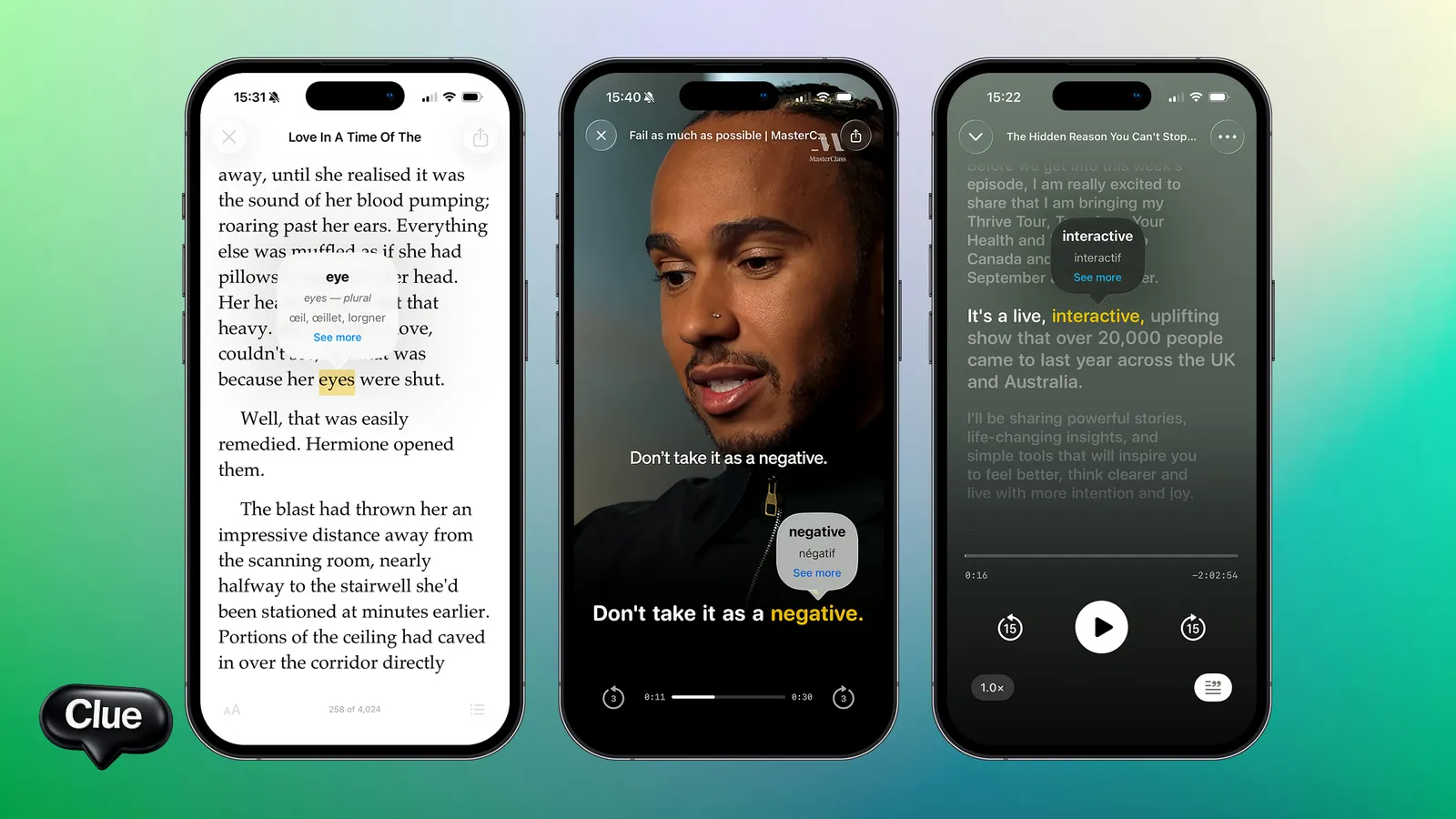
Concretely:
The full English dictionary. 27,000 headwords. Bundled with the app. Works offline. No per-lookup limit.
Tap-to-translate in your native language across all 10 supported languages: Russian, Spanish, French, German, Italian, Portuguese, Dutch, Polish, Ukrainian, Turkish.
Reader for books. EPUB, PDF, or plain-text files. Drop in any DRM-free book. Project Gutenberg’s 70,000 free books are immediately available.
Podcast import. Paste any RSS feed. New episodes appear automatically. Transcripts pulled or generated on-device.
On-device Whisper transcription. Any podcast without a published transcript gets transcribed on your phone. No cloud upload, no per-minute fee.
YouTube subtitle import. Paste a video URL; Clue parses the captions for tap-to-translate.
Movie subtitle support. Drop in any SRT file. Play the film on a separate device and follow along in Clue.
Saved-word library. Every word you save is kept with the sentence it came from. The library grows naturally over time.
Flashcard practice mode. Multiple-choice quizzes pull from your saved words using the original sentence as context.
Offline mode. Dictionary, library, practice — all work without internet.
That’s the whole product, and it’s all free.
What’s not included
To be honest about the gaps:
No live tutor. If you want one-on-one conversation practice, use italki or Preply alongside Clue. The two tools complement each other — Clue for input, a tutor for output.
No structured course. Clue assumes you’ve already built basic English foundations (~A2 minimum). For absolute beginners, start with Duolingo or a textbook, then add Clue when you can read a paragraph.
No speaking practice. Clue is input-only. For output practice, use a tutor, a language exchange app, or a conversational AI tool.
Mobile only. Available on iOS and Android as of 2026, but there is no web or desktop version.
No web or desktop version. Mobile-first by design. If you do most reading on a laptop, this is a real limit.
English only. If you also want to learn Spanish, French, or Japanese, Clue can’t help. LingQ or a separate tool would be better for multi-language learners.
Smaller curated library. Clue ships with a starter set. Most of the value is in what you bring (your podcasts, your books). Compared to LingQ’s decade-old curated library, Clue’s is smaller.
The honesty matters because choosing a free tool with the wrong limits wastes your time. If you only study on a desktop, Clue is irrelevant. If you’re an absolute beginner, Clue is too advanced. If you want a web or desktop app, Clue won’t work for you.
The economics from a learner’s perspective
The cost of language learning tools over five years:
- Duolingo Super: ~$420
- Babbel: ~$420
- Busuu Premium: ~$420
- Rosetta Stone: ~$540 (or ~$179 lifetime if you catch a sale)
- LingQ Premium: ~$540
- Preply tutor (1 hour/week at $20/hr): ~$5,200
- All of the above: ~$7,540
- Clue: $0
That’s a real difference. Most learners pick one or two paid tools rather than all of them, but $200–500 per year in language-learning subscriptions is common for serious students.
Whether that money is well-spent depends on what you use. A weekly tutor is usually the best single investment if your budget allows ($1,000/year for ~50 hours of one-on-one practice). A paid app subscription is often less valuable than the free alternatives.
When to pay for a language tool
Paid tools are worth it when:
- You need structured instruction. Beginner courses (Duolingo Super, Babbel) for the first three months may be worth the money to remove ads and friction.
- You need a tutor. Live speaking practice is hard to replicate for free. Italki tutors start around $10/hour.
- You’re at C1+ and want deep configuration. LingQ’s mature SRS and curated library may be worth the subscription if you study seriously every day.
- You want a specific feature (Lingopie’s licensed TV library, Babbel’s grammar drills, etc.) and the free alternatives don’t provide it.
Paid tools are not worth it when:
- The free version covers your needs. Don’t pay for features you wouldn’t actually use.
- You’re using the subscription as motivation. “If I pay, I’ll be more committed” usually leads to a forgotten subscription rather than a habit.
- You’re not yet at the level the tool serves. Paying for LingQ Premium at A1 is wasted money.
FAQ
Is Clue really free?
Yes. No subscription tier, no ads, no caps on saved words, no per-lookup fees. The full app works for everyone in all 10 supported native languages.
What’s the catch?
The trade-offs are functional, not economic: mobile only, English only, no live tutor, no speaking practice. If those limits matter to you, Clue isn’t the right tool. If they don’t, the app is genuinely free.
Are there ads?
No. None. The reading and listening flow is what Clue is selling; interrupting it with ads would defeat the product.
Does it work without internet?
Yes. The dictionary, your saved library, podcast transcripts you’ve already downloaded, and practice mode all work offline. You only need internet to download new content.
Is there an Android version?
Yes — Clue is now available on both iOS and Android.
How does Clue make money if it’s free?
The team has kept the app structurally free — small team, narrow scope, no marketing budget, no server-heavy features. The model doesn’t depend on monetization, which is unusual but workable for a focused product.
Is the free tier ever going to be removed?
There is no plan to add a subscription tier or paid features. The whole product strategy depends on being free.
Can I use multiple language-learning apps together?
Yes, and most serious learners do. A common combination: Duolingo (beginner foundations), Clue (real-content immersion), a weekly tutor on italki (speaking practice). Each tool covers a different need.
Free, on your phone, ready in 60 seconds
Download Clue, pick your native language from the 10 supported, drop in one podcast you’ve always wanted to understand or one book you’ve always meant to read, and start tapping. A week of real use is enough to know whether the workflow fits — and Clue stays completely free either way.
The honesty matters: Clue isn’t free because it’s secretly going to charge you later, and it isn’t free because it’s a hobby project on the verge of abandonment. It’s free because the model was designed that way — narrow scope, small team, on-device computation, no marketing budget. The trade-offs are real (mobile only, English only, no live tutoring) but they’re functional rather than economic. If those limits fit your situation, the app has no catch.
Frequently asked questions
Is there a truly free app to learn English? +
A few apps are usable for real learning without paying, but most 'free' apps gate the useful parts — offline lessons, unlimited reviews, grammar explanations — behind a subscription, or fund the free tier with ads and daily limits. Always check what the free version actually lets you do before committing your time to it.
Is Duolingo really free? +
Duolingo has a genuinely free tier, but it's ad-supported and limits things like hearts/mistakes; the smoother, ad-free, unlimited experience is the paid plan. So it's 'free with friction' — common across the category, where the free version works but nudges you toward a subscription.
What's the catch with free English learning apps? +
Usually one of: ads, daily limits, locked core features (offline mode, grammar, speaking practice), or a free trial that converts to a paid plan. None of these are necessarily bad — but 'free' rarely means 'the full product at no cost,' so it's worth reading what each tier includes.
Which free app is best for learning English from real content? +
If your goal is understanding real English (not just drills), look for apps that let you learn from authentic podcasts, videos and books with instant word lookups. Clue does this for free — you bring real content and tap any word for an instant translation, which builds comprehension faster than isolated exercises.
Read in other languages
Related articles
- English for Beginners: What to Actually Do in Your First Three Months A practical guide for absolute English beginners. What to study, in what order, with what tools. Honest about what works in months one to three.
- English Short Stories for Learners A2–C1: The Best Way to Read Your Way to Fluency Reading short stories in English is one of the most efficient ways to build vocabulary, absorb grammar patterns, and develop a feel for how native speakers
- English for Advanced Learners: From C1 to Native-Level Fluency What the journey from C1 to genuinely native English requires. Idioms, register, cultural references, dense literary fiction. Specific resources.
- English Phrasal Verbs: 40 You Actually Need, Grouped by Where You'll Use Them You sit through a meeting and catch every word but not the meaning, because someone said "let's circle back" and "we need to roll this out" and "can you…